PID Control of Chlorine Injection
This example demonstrates how to use a simple PID controller for controlling the Chlorine injection in a simple EPANET scenario.
[1]:
from IPython.display import display, HTML
display(HTML('<a target=\"_blank\" href=\"https://colab.research.google.com/github/WaterFutures/EPyT-Control/blob/main/docs/examples/pid_control.ipynb\"><img src=\"https://colab.research.google.com/assets/colab-badge.svg\" alt=\"Open In Colab\"/></a>'))

[2]:
%pip install epyt-control --quiet
Note: you may need to restart the kernel to use updated packages.
[3]:
import numpy as np
from epyt_flow.data.benchmarks import load_leakdb_scenarios
from epyt_flow.simulation import ScenarioSimulator, EpanetConstants, ModelUncertainty, \
    ScenarioConfig, ScadaData, SensorConfig
from epyt_flow.uncertainty import AbsoluteGaussianUncertainty
from epyt_flow.utils import to_seconds, plot_timeseries_data

from epyt_control.envs import EpanetControlEnv
from epyt_control.envs.actions import ChemicalInjectionAction
from epyt_control.controllers import PidController
Create a simple EPANET scenario based on the Hanoi network from LeakDB where a single chlorine injection pump at the reservoir must be controlled:
[4]:
def create_scenario():
    # Create a scenario based the LeakDB Hanoi
    [scenario_config] = load_leakdb_scenarios(scenarios_id=list(range(1)), use_net1=False)
    with ScenarioSimulator(scenario_config=scenario_config) as sim:
        # Set simulation duration to 20 days
        sim.set_general_parameters(simulation_duration=to_seconds(days=20))

        # Enable chlorine simulation and place a chlorine injection pump at the reservoir
        sim.enable_chemical_analysis()

        reservoid_node_id, = sim.epanet_api.get_all_reservoirs_id()[0]
        sim.add_quality_source(node_id=reservoid_node_id,
                               pattern=np.array([1.]),
                               source_type=EpanetConstants.EN_MASS,
                               pattern_id="my-chl-injection")

        # Set initial concentration and simple (constant) reactions
        for node_idx in sim.epanet_api.get_all_nodes_idx():
            sim.epanet_api.set_node_init_quality(node_idx, 0)
        for link_idx in sim.epanet_api.get_all_links_idx():
            sim.epanet_api.setlinkvalue(link_idx, EpanetConstants.EN_BULKORDER, -.5)
            sim.epanet_api.setlinkvalue(link_idx, EpanetConstants.EN_WALLORDER, -.01)

        # Set flow and chlorine sensors everywhere
        sim.sensor_config = SensorConfig.create_empty_sensor_config(sim.sensor_config)
        sim.set_flow_sensors(sim.sensor_config.links)
        sim.set_node_quality_sensors(sim.sensor_config.nodes)

        # Specify uncertainties
        my_uncertainties = {"global_demand_pattern_uncertainty": AbsoluteGaussianUncertainty(mean=0, scale=.2)}
        sim.set_model_uncertainty(ModelUncertainty(**my_uncertainties))

        # Export scenario
        sim.save_to_epanet_file("cl_injection_scenario.inp")
        sim.get_scenario_config().save_to_file("cl_injection_scenario")
[5]:
create_scenario()
Create a simple environment derived from epyt_control.envs.EpanetControlEnv (equivalent to epyt_control.envs.HydraulicControlEnv) where the aforementioned chlorine injection pump at the reservoir (node ID “1”) must be controlled such that the chlorine concentration at all nodes is between \(0.2\) mg/l and \(2\) mg/l:
[6]:
class SimpleChlorineInjectionEnv(EpanetControlEnv):
    """
    A simple environment for controlling the chlorine injection.
    """
    def __init__(self):
        scenario_config_file_in = "cl_injection_scenario.epytflow_scenario_config"

        super().__init__(scenario_config=ScenarioConfig.load_from_file(scenario_config_file_in),
                         chemical_injection_actions=[ChemicalInjectionAction(node_id="1",
                                                                             pattern_id="my-chl-injection",
                                                                             source_type_id=EpanetConstants.EN_MASS,
                                                                             upper_bound=15000.)],
                         autoreset=False,
                         reload_scenario_when_reset=False)

    def _compute_reward_function(self, scada_data: ScadaData) -> float:
        """
        Computes the current reward based on the current sensors readings (i.e. SCADA data).
        The reward is zero iff all chlorine bounds are satisfied and negative otherwise.

        Parameters
        ----------
        :class:`epyt_flow.simulation.ScadaData`
            Current sensor readings.

        Returns
        -------
        `float`
            Current reward.
        """
        # Sum up (negative) residuals for out of bounds Cl concentrations at nodes -- i.e.
        # reward of zero means everythings is okay, while a negative reward
        # denotes Cl concentration bound violations
        reward = 0.

        # Regulation Limits
        upper_cl_bound = 2.  # (mg/l)
        lower_cl_bound = .3  # (mg/l)

        new_sensor_config = SensorConfig.create_empty_sensor_config(scada_data.sensor_config)
        new_sensor_config.quality_node_sensors = scada_data.sensor_config.nodes
        old_sensor_config = scada_data.sensor_config
        scada_data.change_sensor_config(new_sensor_config)

        nodes_quality = scada_data.get_data_nodes_quality()

        upper_bound_violation_idx = nodes_quality > upper_cl_bound
        reward += -1. * np.sum(nodes_quality[upper_bound_violation_idx] - upper_cl_bound)

        lower_bound_violation_idx = nodes_quality < lower_cl_bound
        reward += np.sum(nodes_quality[lower_bound_violation_idx] - lower_cl_bound)

        scada_data.change_sensor_config(old_sensor_config)
        return reward
[7]:
# Create/Load environment
env = SimpleChlorineInjectionEnv()
Create a simple PID controller for controlling the chlorine (Cl) injection. Recall that a reward of zero indicates that Cl bounds at all nodes are satisfied! Also, note that a better performance couod be achieved by properly tuning the gain coefficients:
[8]:
pid_control = PidController(proportional_gain=10., integral_gain=10.,
                            derivative_gain=0.,
                            target_value=0.,
                            action_lower_bound=float(env.action_space.low),
                            action_upper_bound=float(env.action_space.high))
/tmp/ipykernel_986/3140074456.py:4: DeprecationWarning: Conversion of an array with ndim > 0 to a scalar is deprecated, and will error in future. Ensure you extract a single element from your array before performing this operation. (Deprecated NumPy 1.25.)
  action_lower_bound=float(env.action_space.low),
/tmp/ipykernel_986/3140074456.py:5: DeprecationWarning: Conversion of an array with ndim > 0 to a scalar is deprecated, and will error in future. Ensure you extract a single element from your array before performing this operation. (Deprecated NumPy 1.25.)
  action_upper_bound=float(env.action_space.high))
Run the controller – i.e. execute controller on the environment:
[9]:
# Reset environment
env.reset()
reward = 0

# Run controller and environment
rewards = []
actions = []
while True:
    # Compute chlorine injection action
    act = [pid_control.step(reward)]

    # Execute Cl injection and observe a reward
    _, reward, terminated, _, _ = env.step(act)
    if terminated is True:
        break

    # Show observed reward and chosen action
    rewards.append(reward)
    actions.append(*act)
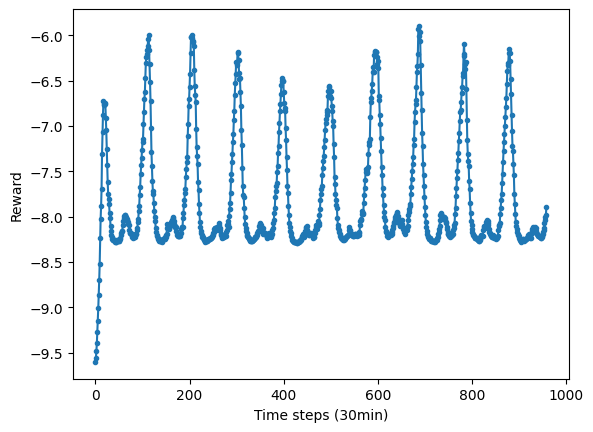
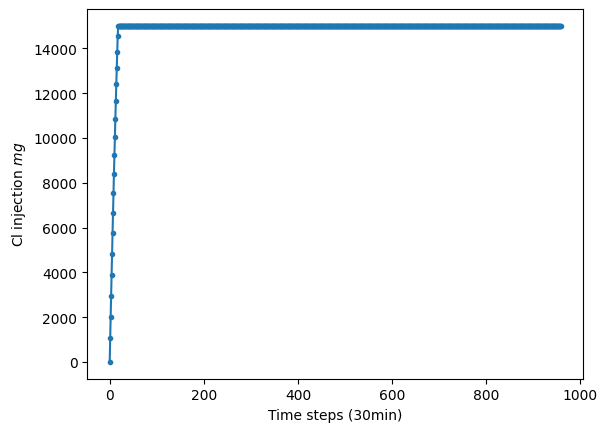
Show results – i.e. reward and action (Cl injection) over time:
[10]:
# Show reward and actions over time
plot_timeseries_data(np.array(rewards).reshape(1, -1),
                     y_axis_label="Reward",
                     x_axis_label="Time steps (30min)")
[10]:
<Axes: xlabel='Time steps (30min)', ylabel='Reward'>
[11]:
plot_timeseries_data(np.array(actions).reshape(1, -1),
                     y_axis_label="Cl injection $mg$",
                     x_axis_label="Time steps (30min)")
[11]:
<Axes: xlabel='Time steps (30min)', ylabel='Cl injection $mg$'>
Do not forget to close the environment by calling the close() function:
[12]:
env.close()
[ ]: